
STEP-UP OMAHA • PRE-REGISTRATION & REGISTRATION
Your Step-Up Omaha
Registration Guide.
Everything applicants and families need to know before attending an in-person registration appointment.
Registration begins before you arrive. Applicants must complete their program application, follow the instructions sent through ADP and SignNow, and bring all required original documents to their scheduled appointment.
Who Is the Applicant?
The applicant is the person applying to participate in the Step-Up Omaha program.
The Applicant’s Information Must Be Entered on the Application.
The applicant’s name, date of birth, contact information, and personal email address must belong to the person who wants to participate in Step-Up Omaha. A parent or guardian may help complete the application, but the applicant’s information must be entered in the fields requesting applicant information.
Use the Applicant’s Own Information
When the application asks for the applicant’s information, enter the information of the person applying to the program.
Parents and guardians should not enter their own name, email address, or other personal information in fields intended for the applicant.
Use the Parent or Guardian Fields
The application may request separate information for a parent or legal guardian.
Enter the parent or guardian’s information only in the fields specifically designated for them. This helps ensure that program communications and required consent forms reach the appropriate person.
Every Applicant Needs Their
Own Personal Email Address.
The email address entered in the Applicant Email field must belong to the person applying to participate in Step-Up Omaha.
The applicant must have their own personal email address that they can access throughout the program. Parents and guardians may assist applicants, but their email address must not replace the applicant’s personal email address in the Applicant Email field.
Applicants Must Be Able to Access ADP
Step-Up Omaha uses ADP for pre-registration, payroll, timekeeping, and other program-related activities.
Applicants who are accepted into the program will need continued access to their ADP accounts throughout their participation.
This is especially important for participants ages 16–21, who will use ADP to clock in and out of their assigned worksites and review timekeeping and payroll information.
Applicants must maintain access to their own ADP accounts. ADP login credentials should not be shared with others.
Choose an Email Account You Can Access
Applicants should use an active personal email account that they regularly check and can access independently.
- Personal email: Required.
- School email: Not permitted.
- Parent or guardian email: Not permitted in the Applicant Email field.
- iCloud email: Permitted; see the delivery notice below.
The applicant must be able to receive program messages, open pre-registration links, and access their account when needed.
Why School Email Addresses Cannot Be Used
School-managed email accounts may have security settings that block messages from ADP and other outside platforms. Because these restrictions can prevent applicants from receiving required registration communications, school-issued email addresses are not permitted.
Important Notice About iCloud Email Addresses
Some applicants using iCloud email addresses have experienced difficulty receiving ADP or registration communications. Applicants who choose to use iCloud should regularly check their inbox, spam, and junk folders for messages.
Applicants must be able to access their personal email throughout the application, pre-registration, registration, and program participation process. If an applicant does not already have a personal email address, one should be created before submitting the Step-Up Omaha application.
The applicant’s email address is required for Step-Up Omaha application, pre-registration, registration, and program-related communications.
Four Steps to Prepare
for Registration.
The Step-Up Omaha registration process begins before your in-person appointment. Follow each step carefully.
Complete the Program Application
Submit the Step-Up Omaha program application using the applicant’s correct personal information.
Make sure the Applicant Email field contains the applicant’s own personal email address.
Do not use a school email address or a parent or guardian’s email in this field.
Watch for ADP and SignNow Emails
After applications are reviewed, applicants moving forward in the process will receive instructions through ADP and SignNow.
Check the applicant’s inbox, spam, and junk folders regularly.
These messages contain important instructions for completing required pre-registration and consent forms.
Complete All Online Pre-registration
Follow the instructions in both emails.
Complete assigned ADP forms, upload required identification documents, enter direct deposit information, and submit all required signatures.
Parents or guardians must also complete any required consent forms delivered through SignNow.
Attend Registration Prepared
Attend your scheduled registration appointment with all required original documents.
Bring the exact identification documents uploaded into ADP, along with acceptable household income verification.
All required paperwork must be completed.
Applicants must complete their program application, ADP pre-registration, required SignNow parental consent forms, and document uploads. They must also bring all required original documents to registration. Applicants with missing documents or incomplete paperwork cannot complete registration or be considered for acceptance until those requirements are satisfied.
Two Important Emails.
Two Different Purposes.
Applicants and families may receive separate instructions from ADP and SignNow. Both must be completed.
Pre-registration, Documents, and Payroll
ADP is the platform Step-Up Omaha uses to collect required pre-registration information and documents.
Applicants may be asked to:
- Complete assigned pre-registration forms.
- Upload required identification documents.
- Enter and verify direct deposit information.
- Submit required electronic acknowledgments.
Keep the original identification documents you upload. You must bring those same originals to registration.
Parental Consent Forms
SignNow is the electronic signature platform Step-Up Omaha uses to send and collect required parental consent forms.
Parents or guardians will receive a link to review and electronically sign the required consent documents.
Families should carefully review each form, complete all required fields, and submit the documents as instructed.
Completing ADP does not automatically complete the parental consent forms in SignNow. Both sets of requirements must be finished.
If you do not see your ADP or SignNow email, check your inbox, spam, and junk folders. Do not submit duplicate applications or create duplicate accounts while waiting for registration instructions.
Direct Deposit Is Required.
All applicants must complete direct deposit setup in ADP during pre-registration. Banking information must be entered directly into ADP. Printed banking paperwork is not required at registration.
Applicants must provide valid banking information and complete their direct deposit setup in ADP. Incorrect or incomplete banking information can delay payroll processing and payment.
Banking Information Needed
- Bank or financial institution name.
- Routing number.
- Account number.
- Correct account type: checking or savings.
Applicants must confirm that the routing number, account number, and account type are correct before saving their information in ADP.
Checking and Savings Are Not the Same
ADP will ask whether the account is a checking account or a savings account.
Applicants must select the actual type of account they are using. Selecting the wrong account type or entering an incorrect number may cause payment problems.
If you are unsure of your account information, verify it with your financial institution before completing the ADP setup.
Make the Correct Selections in ADP.
ADP asks what type of payments should go into an account and how much money should be deposited.
Select “All Payment Types”
When ADP asks what type of payment will be deposited into the account, select:
This selection allows the account to receive regular payments, bonuses, and other applicable payments.
Do not select this option unless Step-Up Omaha payroll staff specifically instructs you to do so.
Choose Your Deposit Amount
ADP will ask how much of your payment should be deposited into the account.
Deposits your full payment into one account when you are not splitting your pay.
Deposits a specific dollar amount into an account, such as $50.
Deposits a selected percentage of your payment into an account, such as 25%.
Depositing All Your Pay Into One Account
If you want your entire Step-Up Omaha payment deposited into one bank account, select “All payment types” and “Everything.”
$200
$200
This is the simplest setup when using one bank account.
Splitting Your Pay Between Accounts
For a $200 payment, you could send a specified $50 to savings and the remaining $150 to checking, using ADP’s available remaining-balance settings.
$50
$150
Alternatively, set 25% to savings and 75% to checking. Enter the correct account details and confirm that your instructions cover the full payment. ADP may request a deposit priority number.
Need Help With Your ADP Direct Deposit Setup?
Open the instructional image below. Select the image to view it at full size.
View ADP Instructional Guide +
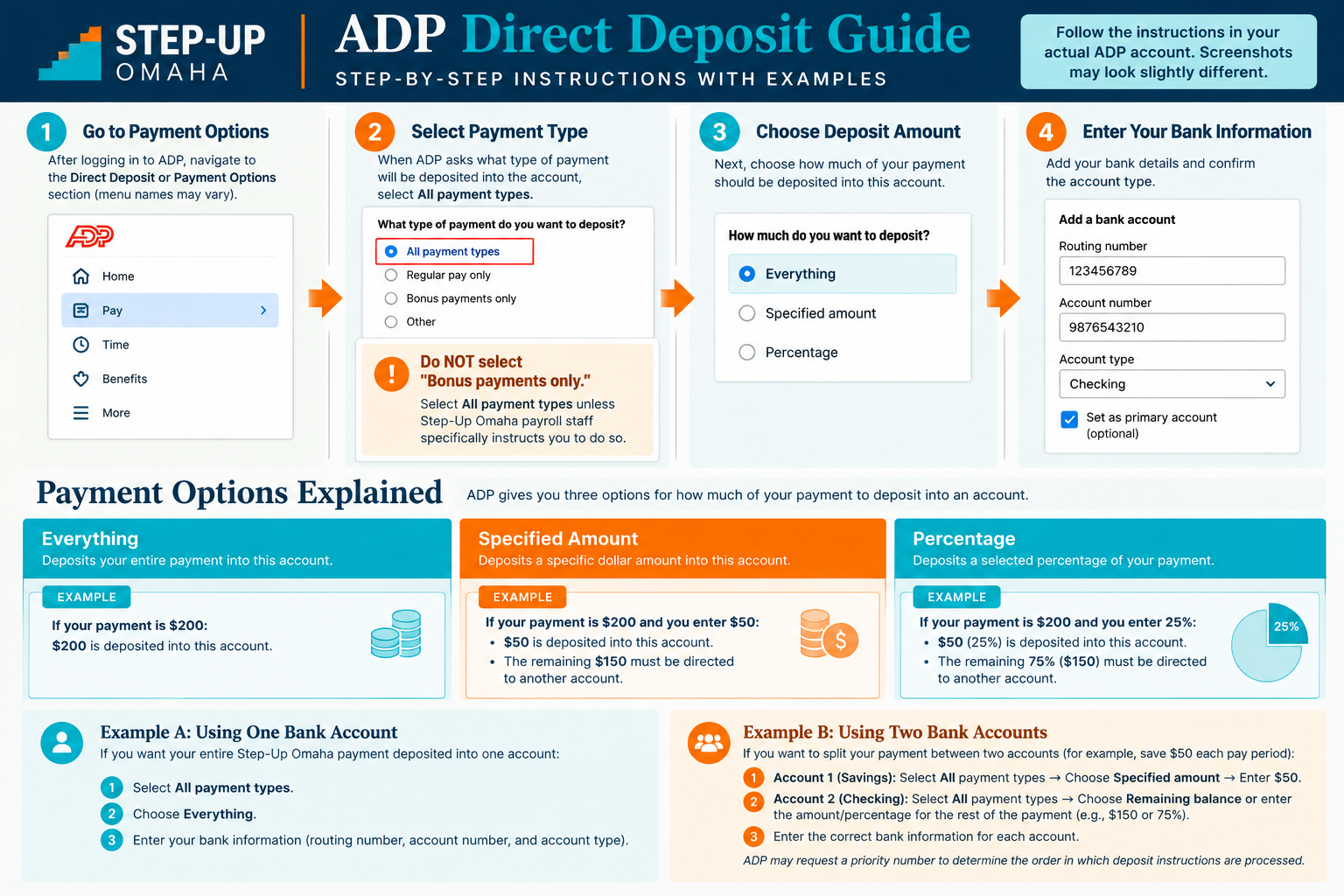
The guide is a reference. Follow the instructions displayed in your actual ADP account.
Bring the Originals.
Not Pictures of Them.
Applicants must bring all required physical documents to registration. Original identification documents must match those uploaded into ADP.
Photographs, screenshots, emailed images, or documents displayed on a phone cannot replace required original identification documents.
Valid State ID or Passport
Every applicant must have a valid state-issued identification card or passport.
Applicants must upload the identification document requested in ADP and bring that same original document to registration.
An applicant cannot complete registration without acceptable identification.
Original Social Security Card
Applicants must provide their Social Security card as required for Step-Up Omaha pre-registration and registration.
Bring the original card to registration. A photograph or screenshot is not a substitute for the original document.
Original Birth Certificate
Applicants must provide an original birth certificate when required as part of their Step-Up Omaha documentation.
If the applicant uses a passport in place of a birth certificate for an applicable documentation requirement, bring that same original passport to registration.
Proof of Household Income
Families must bring acceptable documentation showing household income to registration.
Review the income verification information below before your appointment so you know what documents to prepare.
ADP and Parental Consent Forms
Complete all required ADP pre-registration forms, identification uploads, direct deposit setup, and applicable SignNow parental consent forms before registration.
Missing paperwork may prevent the applicant from completing registration.
Bring the exact original identification documents uploaded into ADP. For example, if you upload a state-issued ID, bring that same ID to registration. If you upload a passport, bring that same passport. Different documents, photographs, or digital copies cannot replace the originals required for verification.
Prepare Your
Proof of Income.
Families must bring documentation that verifies household income. Prepare the most recent applicable records before your appointment.
Income Verification Examples
Depending on the household’s circumstances, income verification may include:
- Recent pay statements or pay stubs.
- Documentation of unemployment benefits.
- Social Security or disability benefit statements.
- Other official documents verifying household income.
Bring documentation covering the most recent 90 days of income.
Make Sure Your Documents Are Complete
Income documentation should clearly identify the individual receiving the income and provide enough information to verify the income reported.
Do not bring incomplete, altered, or unreadable documentation.
If your household has a special income situation or you are unsure which records to provide, contact Step-Up Omaha before your appointment for guidance.
Need to double-check your documents or replace something before registration? Use these resources to prepare.
Make Sure You’re
Ready for Registration.
Use this checklist before leaving for your scheduled registration appointment.
The Step-Up Omaha program application has been submitted.
The applicant has access to their own personal email account.
All required ADP pre-registration forms and document uploads are complete.
Required parental consent forms have been completed through SignNow.
Direct deposit information has been entered and verified in ADP.
The applicant has a valid state-issued ID or passport.
All required original identification documents are ready to bring.
Acceptable household income verification is ready.
Applicants who have not completed required paperwork or who do not have the required original documents cannot complete registration. Please review the requirements carefully before attending.
What Happens
at Registration?
Registration includes reviewing the applicant’s information, verifying required documents, and discussing potential next steps.
Check In
Arrive for your scheduled appointment and follow the check-in instructions provided by Step-Up Omaha staff.
Verify Your Documents
Staff will review required identification and supporting documents. Bring the same original documents uploaded into ADP.
Confirm Completion
Required online paperwork, consent forms, and other registration requirements will be reviewed.
Placement Opportunities
Eligible applicants may receive information about potential program and worksite placement opportunities.
Placement depends on eligibility, program capacity, available positions, and applicable requirements. A specific placement is not guaranteed.
Allow sufficient time for your appointment. Registration may involve waiting, document verification, and additional instructions. Arriving prepared helps the process move more efficiently.
Registration Does Not
Guarantee Acceptance.
Completing the application and registration requirements is necessary to be considered for participation in Step-Up Omaha.
Meeting Program Requirements Matters
Applicants must meet Step-Up Omaha’s eligibility requirements, including applicable age and Omaha-area residency requirements.
Step-Up Omaha gives additional consideration to applicants from lower-income households and families experiencing financial hardship.
Household income information and other eligibility documentation help inform the application review and selection process.
Program Space Is Limited
Step-Up Omaha has a limited number of available opportunities.
Applicants are encouraged to complete their applications and registration requirements as early as possible.
Acceptance is not determined solely on a first-come, first-served basis. Eligibility, financial need, completed requirements, and available program opportunities are also considered.
Submitting an application or completing registration does not reserve or guarantee a place in the program.
Applicants must meet all applicable program requirements. Step-Up Omaha considers eligibility, household circumstances, completed registration requirements, and available program capacity when determining participation opportunities.
FINAL REGISTRATION REMINDER
Be Prepared.
Bring Everything You Need.
Complete your application, watch for ADP and SignNow emails,
finish all required online paperwork, and bring your original
documents and household income verification to registration.
Applicants must meet all registration requirements to be
considered for participation. Completing registration does
not guarantee acceptance.
REGISTRATION VIDEO GUIDE
Already Applied?
Watch six short videos covering required original documents,
ADP pre-registration, common registration mistakes, and what
happens during your appointment.